How to Write the Results Section
What to report in your quantitative results chapter, and in what order


The 30-second summary
Your results chapter reports what your quantitative data show, in a logical order, and saves interpretation for the discussion.
- Report what answers your research questions, not every test you ran. Your aims and questions decide what earns a place.
- Lead your data with your sample: who responded, and how closely they resemble the population you want to say something about.
- Show that your measures hold up: report a reliability score such as Cronbach’s alpha for each scale, and check the shape of your data.
- Then present your statistics: descriptive first, then any inferential tests, with a supported or not-supported verdict per hypothesis.
- Write in the past tense, give every main number a sentence saying what it shows, and close with a short summary.
If you want to fast-track the process, our free results chapter template lays out the structure, with a worked example for each section.
Navigate
The results chapter is where your committee or examiners check whether your data actually answer your research questions. Hand them a pile of statistics output, or start interpreting too early, and the chapter reads as either a data dump or a discussion chapter in disguise.
In our work with 10,000+ students, we’ve seen that the analysis is rarely what trips people up in this chapter. It’s deciding what to report, and in what order. In this post, I’ll walk you through the eight steps of a quantitative results chapter, and show you how four real dissertations handled the hardest ones. If your study is qualitative, our guide to the qualitative findings chapter is the one you want.
What exactly is the results chapter?
The results chapter (also called the findings or analysis chapter) shows your reader what you found in the quantitative data you collected. In most dissertations or theses, it’s Chapter 4, sitting between the methodology and the discussion chapter. It presents your data in a clear written narrative, supported by tables, graphs and charts, and flags anything unusual you came across along the way, such as outliers.
“But how’s that different from the discussion chapter?”
In the results chapter, you only present your statistical findings: the numbers and what they show, no more and no less. In the discussion chapter, you interpret those findings and link them to prior research (your literature review), your research objectives and your research questions. Put simply, the results chapter describes the data, while the discussion chapter explains what they mean.

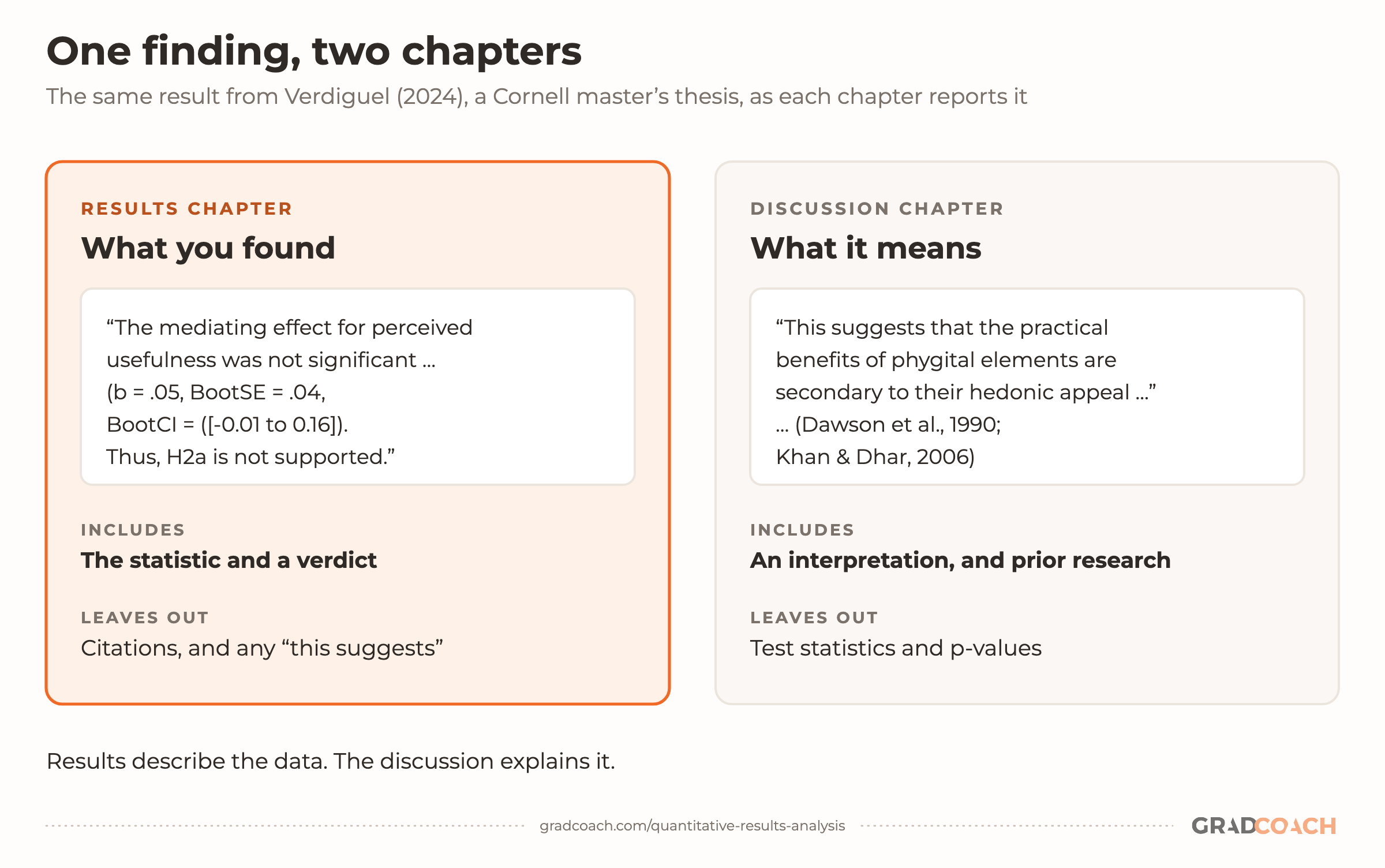
The drawing above comes from a real thesis. This Cornell master’s thesis in human-environment relations ran an experiment comparing a traditional luxury store with a “phygital” one (a physical store with digital elements), and tested whether shoppers’ sense that the store was useful explained why the phygital version raised their intention to buy. Here’s how its results chapter reports the answer:
And here’s the same finding a few pages later, in the discussion chapter:
Notice what changes between the two. The results version gives the statistic and a verdict on the hypothesis, with no citations and no “this suggests”. The discussion version drops the numbers, says what the finding might mean and brings in other people’s research. Keep that line clean in your own chapters: if a sentence explains why something happened, it belongs in the discussion.
Some universities prefer you to combine the results and discussion chapters, and the Purdue thesis in Step 3 does exactly that, under the title “Results and Discussion”. Even then, it’s good practice to keep the two elements separate within the chapter, so your findings are fully described before you interpret them. If you’re unsure, check your program’s handbook or ask your advisor (supervisor, in the UK).
What should you include in the results chapter?
Once you’ve run your data analysis, you’ll almost certainly have a mountain of SPSS or R output, far more than your chapter needs, and it’s your job to cut through it.
That doesn’t mean those analyses were a waste of time. They gave you a solid understanding of your dataset and how to read it. But your committee doesn’t need to see the 165 histograms you created.
“So how do I decide what’s relevant?”
The test is whether a result reflects and serves the purpose of your study. Go back to your research aims, objectives and research questions and use them as a litmus test for every table and statistic. Keep them in front of you while you write, so that you stay on track.
As a general guide, a quantitative results chapter typically includes the following, which lines up with what APA’s reporting standards ask a quantitative report to cover:
- Some demographic data about your sample
- Reliability tests (if you used measurement scales) and a check on your data’s shape
- Descriptive statistics
- Inferential statistics (if your research questions require them)
- Hypothesis tests (again, if your research questions require them)
Steps 3 to 7 below take each of these in turn. Not every study needs all five, but the order matters: each one gives your reader what they need to trust the next.
Your results chapter also needs to lay the foundation for your discussion chapter. Anything you plan to interpret in the discussion has to be reported here first. For example, if you plan to highlight a strong relationship between two variables in your discussion, the correlation or regression analysis that shows it belongs in your results chapter.
How do I write the results chapter?
I’d break the write-up into eight steps. How many apply to you depends on your research questions, but these generic steps fit most dissertations and theses.
Step 1 – Revisit your research questions
Start by revisiting your research objectives and research questions. These should be the driving force behind both your results and discussion chapters, so review them and ask which statistical analyses and tests (from your mountain of output) specifically help you answer each one. For each research objective and question, list the specific piece or pieces of analysis that address it.
It’s also useful to note the points you want to raise in your discussion chapter, so you have a clear reminder of which results to highlight here. Again, list each point beside the analysis that supports it.
Then draw up a rough outline of the chapter: which analyses you’ll present, and in what order. The rest of the steps describe the standard order, but I’d always outline a chapter before writing it, whichever chapter it is.
If you’d like a refresher on how your aims, objectives and research questions fit together, the video below walks through it:
Step 2 – Craft an overview introduction
As with every chapter of your dissertation or thesis, open your quantitative results chapter with a brief overview of what you’ll do in it and why. For example, you might explain that you’ll start with the demographic data, to show how representative the sample is, before moving on to the reliability of your scales, your descriptive statistics and then each hypothesis in turn.
Keep this short: a paragraph or two at most. It’s also a good idea to weave your research questions into it, so there’s a golden thread running through your document from the introduction to the conclusion.
Step 3 – Present the sample demographic data
The first set of data you’ll present is an overview of the sample demographics: who your respondents are. If you ran a survey, start with how many people you invited and how many usable responses you got. Then describe the sample. For example:
- What age range are they?
- How is gender distributed?
- How is ethnicity distributed?
- Where do the participants live?
The purpose is to show how representative your sample is of the broader population, which matters for the generalizability of your results. If your sample isn’t representative, you won’t be able to generalize your findings with confidence. That isn’t the end of the world, but it is a limitation you’ll need to acknowledge.
Of course, to judge representativeness you need a clear view of the population’s demographics too. So design your survey to capture the demographic information you’ll compare your sample against.
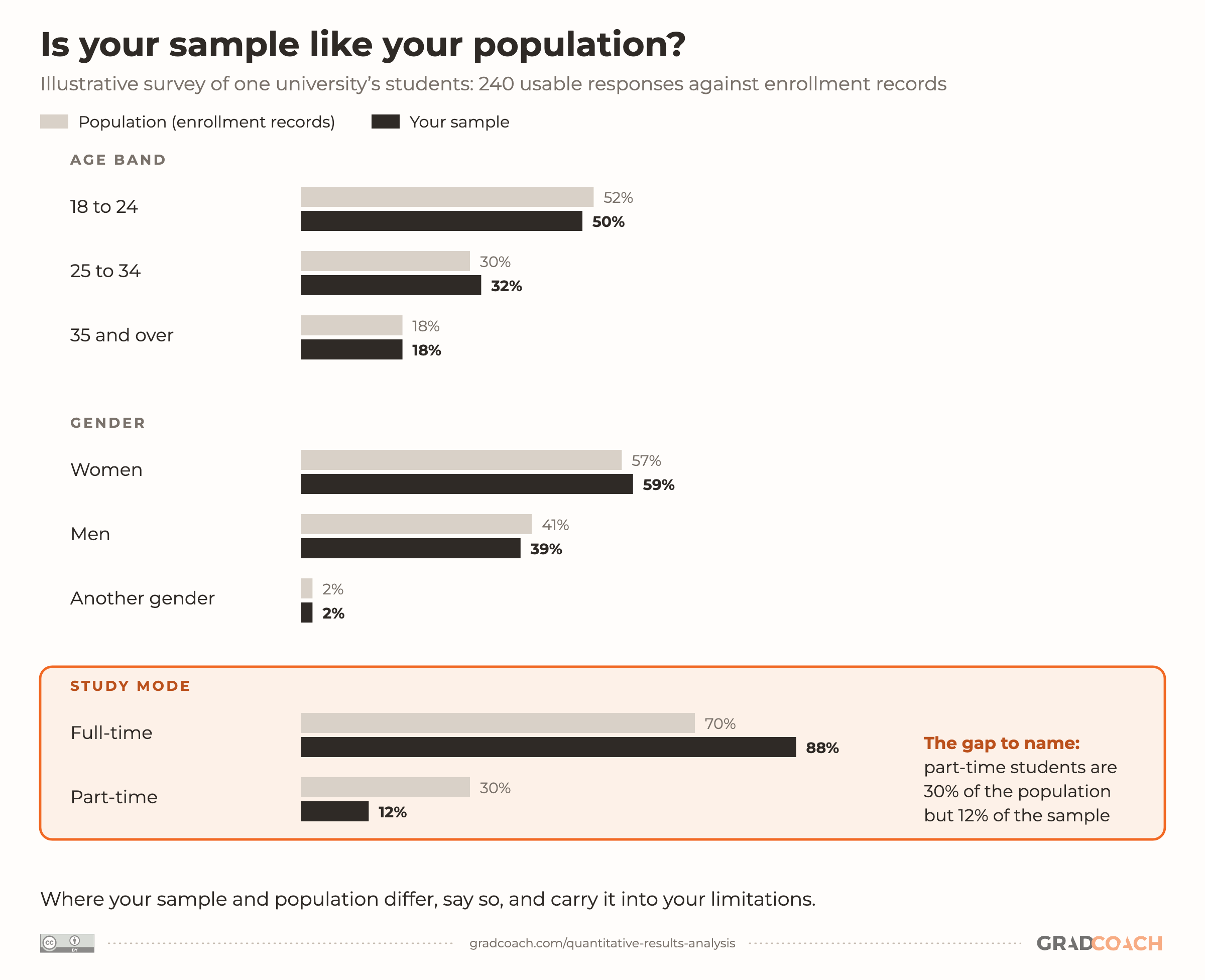
Here’s what that comparison looks like for an illustrative survey:

An education master’s thesis from Purdue, which surveyed 100 university students of Japanese, shows how to report a mismatch honestly (it reports its sample in the methodology chapter, which some programs prefer). Pay close attention to the last sentence:
Osumi sets the sample beside the thesis’s own figures for first-year classes and names the gap instead of hiding it. Do the same in yours: if a group is under- or over-represented, say so plainly, then carry the point into the limitations section of your discussion or conclusion.
“But what if I’m not interested in generalizability?”
Even if you don’t intend to extrapolate your findings to a broader population, knowing your sample helps you put your findings in context. For example, if 80% of your respondents were over 65, that could be an important factor when you interpret the data. So it’s still worth understanding and presenting your demographic data.
Step 4 – Review composite measures and data “shape”
Before you report any statistical analysis, you need to show that your data are suitable for the methods you’ve used. If your data don’t meet the assumptions of a statistical technique, your results can be misleading. So you may need to show that your methods are “allowed”.
Most commonly, there are two areas to pay attention to: composite measures and the shape of your data.
Composite measures
The first applies when you have several scale-based items that combine to capture one construct. That combination is called a composite measure. For example, you might have four Likert-scale items that should all measure the same thing in slightly different ways, so respondents should rate them similarly. This is called internal consistency.
Internal consistency isn’t guaranteed, especially if you developed the measures yourself, so you need to test the reliability of each composite measure. Cronbach’s alpha is the most common test. It shows how closely the items hang together, though a high alpha alone doesn’t prove they measure one thing.
In their widely cited guide, Tavakol and Dennick note that reported acceptable values range “from 0.70 to 0.95”, and that a very high alpha can mean some items are redundant. A low alpha can come from having few items, but if it’s because the items correlate poorly, you may need to revise or drop one or more of them. There’s more on what a good alpha looks like in my guide to validity and reliability.
If you’d like a refresher on reliability, and how it differs from validity, the video below explains both:
Asking whether Vietnamese online shoppers will collect parcels from pickup points instead of taking home delivery, a business PhD surveyed 440 of them on five-point Likert scales and reported its alphas in four sentences:
Luong names the threshold and its source, admits the item it dropped and why, gives the range of alphas (CPL is the study’s complexity scale) and says what that means for the analysis. Report yours the same way, with the full set of alphas in a table, so your committee can see every scale at once.
Data shape
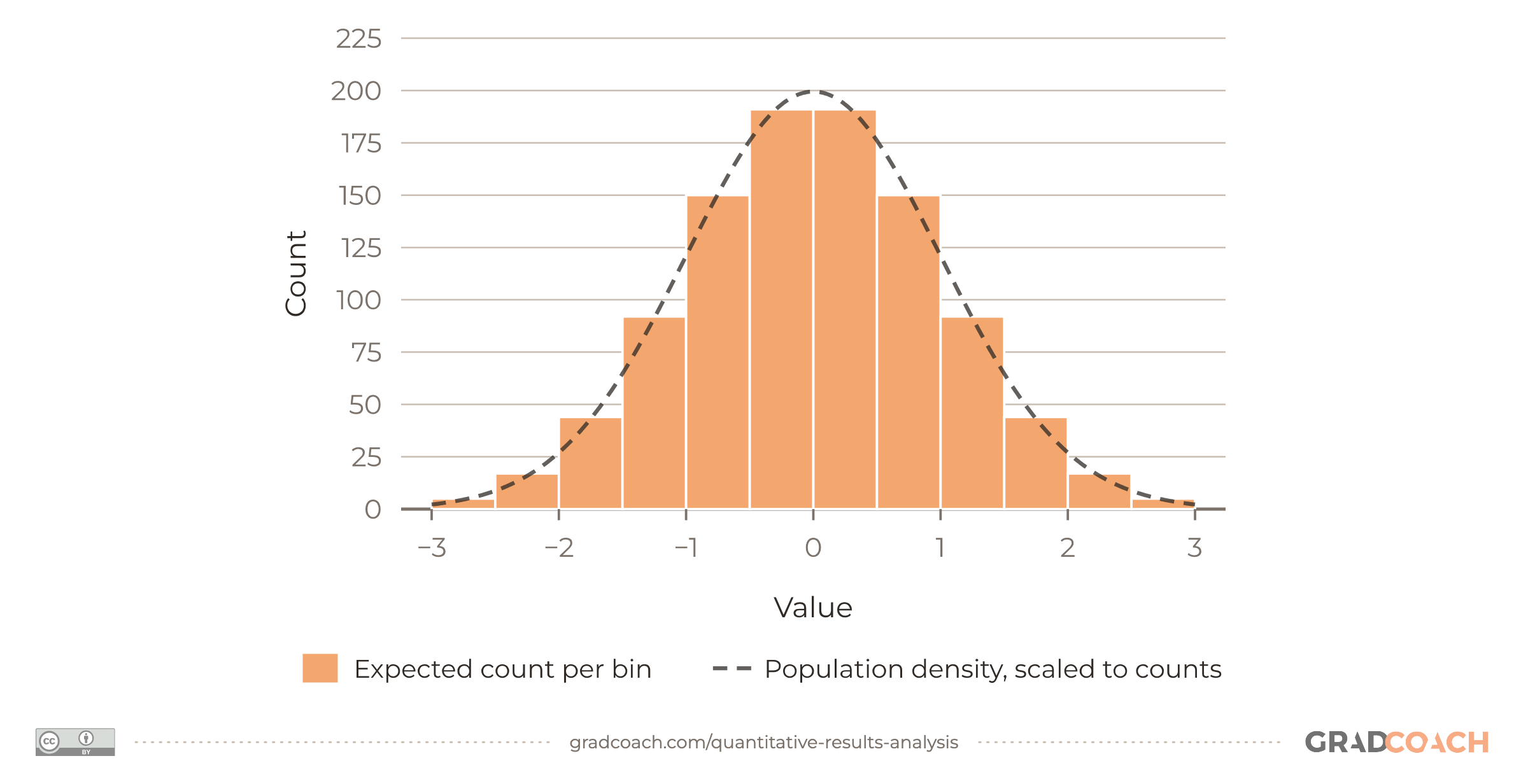
The second thing to address early on is the shape of your data. Many common inferential tests, such as t-tests and ANOVAs (more on these below), assume your data are roughly normally distributed. That means a bell shape: most values sit in the middle, and the rest tail off evenly on both sides. Tests that make this assumption are called parametric tests.
Strictly speaking, it’s the scores within each group that need to be roughly normal, or, in a regression, the residuals (the gaps between the values your model predicts and the ones you actually observed).
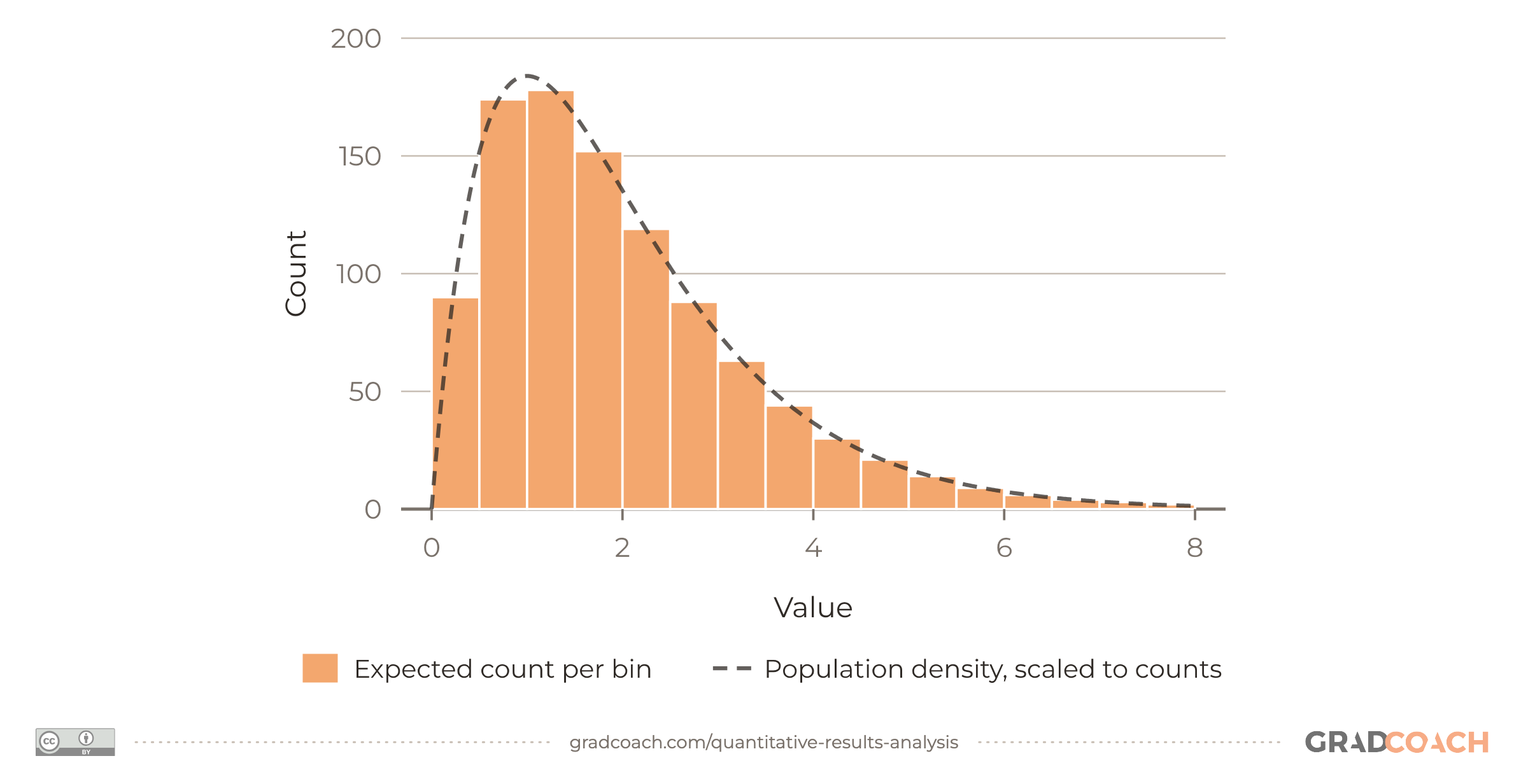
If your data are clearly skewed (bunched up at one end, with a long tail of less common values stretching out toward the other), you may need non-parametric alternatives instead, though a large sample makes parametric tests fairly forgiving of a little skew.
Symmetry is part of normality, but it isn’t the same thing. A perfectly flat spread of values is symmetric too, and nowhere near normal. So look at the histogram as well as the numbers. These are the two shapes you’ll meet most often:


To assess the shape of your own data, you’ll look at the histogram alongside a few descriptive statistics (such as the mean, median and skewness), which I’ll cover in the next step.
Reporting the check can take two short paragraphs. Validating a measure of vicarious trauma (the toll of hearing about clients’ trauma), the clinical psychology doctorate below had a large sample of 418 helping professionals, and it reported the check like this (the acronyms in brackets are its questionnaires, and CFA is confirmatory factor analysis, which tests whether a measure’s items group together the way it says they should):
Notice the sequence:
- Why perfect normality isn’t required at this sample size
- What was inspected: histograms, boxplots, skewness and kurtosis
- The cut-offs it used
- The decision that followed
The extract doesn’t give a source for its cut-offs, and yours should, since guidance varies by field.
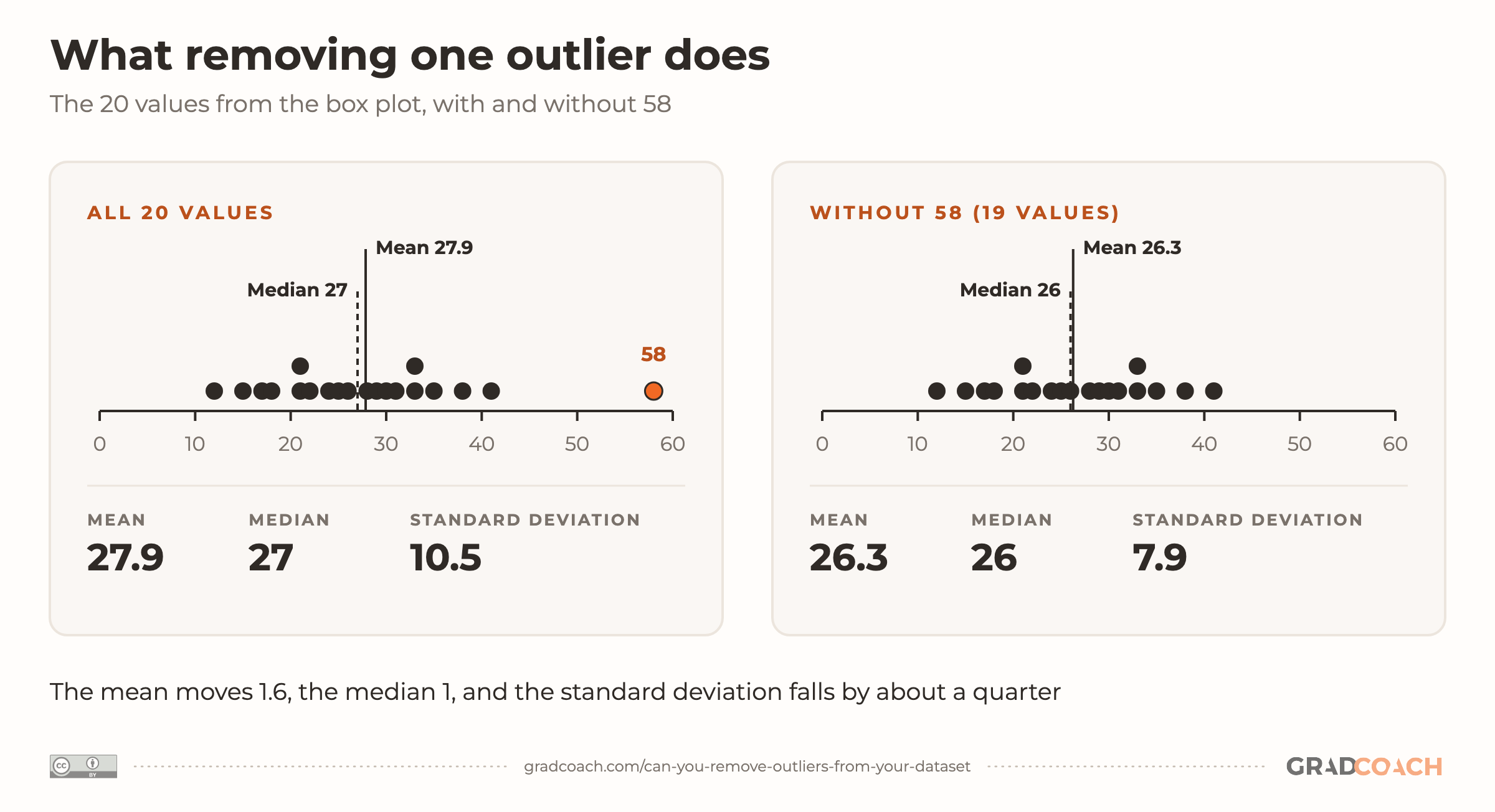
The same goes for outliers. If you screened for them, the rule you used goes in your methodology, and the counts, plus any with-and-without comparison, go here. One value can shift your descriptive statistics on its own, as the drawing below shows:

If you want to learn more about when and how to remove outliers (and how to report it), check out our outliers explainer.
Step 5 – Present the descriptive statistics
With the groundwork laid (the representativeness of your sample, the reliability of your measures and the shape of your data), you can move on to the statistical analysis itself, starting with the descriptive statistics for your variables.
For numerical data, including scale scores, this usually covers:
- The mean: the mathematical average of a set of numbers.
- The median: the midpoint of a set of numbers when they’re arranged in order.
- The mode: the value you see most often.
- The standard deviation: the typical distance between a score and the mean, so a small one means tightly bunched scores.
- Skewness: whether the scores lean to one side, with a longer tail toward the low or the high end.
- Kurtosis: how heavy the tails of the distribution are, compared with a normal distribution.
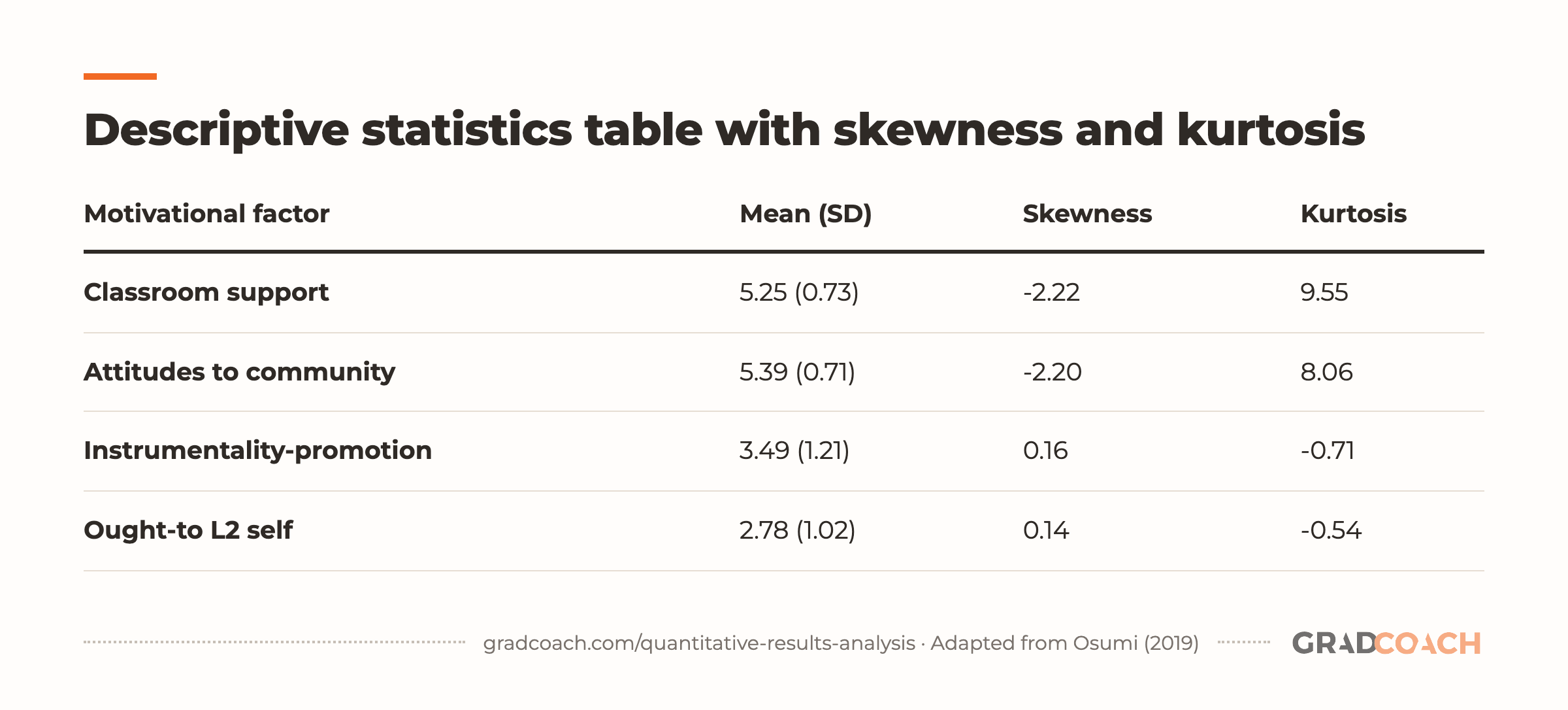
A single table showing these for several variables at once is an economical way to present them. This one shows four of the eleven rows from the descriptives table in the Purdue thesis from Step 3, where students rated their motivation on scales with a maximum score of 6:
| Motivational factor | Mean (SD) | Skewness | Kurtosis |
|---|---|---|---|
| Classroom support | 5.25 (0.73) | -2.22 | 9.55 |
| Attitudes to community | 5.39 (0.71) | -2.20 | 8.06 |
| Instrumentality-promotion | 3.49 (1.21) | 0.16 | -0.71 |
| Ought-to L2 self | 2.78 (1.02) | 0.14 | -0.54 |
Adapted from Osumi (2019), Table 3.
Notice that the two factors rated closest to the maximum of 6 also carry the most extreme skewness and kurtosis in the whole table. When nearly everyone ticks the top of a scale, the scores pile up at one end and the tail runs out to the left: the mirror image of the right-skewed histogram above, often called a ceiling effect. The thesis analyzed its data with Spearman’s rank-order correlation, a non-parametric test, alongside one-way ANOVAs.
The thesis then says in words what the table shows: “This table indicates that participants gave a high rating to most of the motivational factors.” Pair your own table with a sentence like that, and look for the same warning signs in your data before you choose your tests.
For categorical data, where you show the number or percentage of people in each category, you can either describe the percentages in the text or use charts (such as bar charts and pie charts) to present them. If you’re unsure which kind fits your data, there’s a guide to choosing the right chart.
When you use figures, label them simply and clearly, so your reader can understand them at a glance. There’s nothing more frustrating than a graph with no axis labels! And keep in mind that your text has to tell a clear story on its own. Don’t rely on your figures and tables to make your main points: highlight the important trends and values in the text. Figures and tables should support the writing, not carry it.
If you’d like a refresher, the video below walks through the mean, median, mode, variance and standard deviation:
Depending on your research questions, you may stop your analysis here, with descriptive statistics. If your study needs inferential statistics, though, those come next.
Step 6 – Present the inferential statistics
Inferential statistics use your sample to draw conclusions about a population, whereas descriptive statistics describe only the sample itself. Inferential techniques, broadly speaking, fall into two groups:
- Tests that compare groups, such as t-tests (which compare the means of two groups) and ANOVAs (which compare the means of three or more).
- Tests that assess relationships between variables, such as correlation and regression analysis.
Within each group, parametric tests assume roughly normal data, while non-parametric tests are designed for data that aren’t, which is why Step 4 comes first. For each of those tests in plain English, see this walkthrough of quantitative analysis methods.
There’s a seemingly endless number of tests you could use, so it’s easy to run down a rabbit hole and end up with piles of output. The most important thing is to use the tests that answer your research questions, and to report them fully. If you’re still deciding which ones those are, start with how to choose the right statistical test. In my experience, a chapter with three well-reported tests reads far better than one with fifteen half-explained ones.
APA’s reporting standards, for instance, ask for the exact p value of every test you ran, plus an effect size and confidence interval with each one “when possible”. If you’re not sure what a p-value tells you, it’s worth getting that clear before you write this section.
In this section, use figures and visuals as effectively as you can. For example, if you present a correlation table, shade it to highlight the significant correlations, or add a scatterplot to show the trend. The easier you make your findings to digest, the more effectively you’ll be able to build your argument in the next chapter.
Step 7 – Test your hypotheses
If your study requires it, the next stage is hypothesis testing. In practice, your hypothesis tests are your inferential tests. What changes here is how you write them up: one hypothesis at a time, each with a verdict.
A hypothesis is a statement that a statistical test can support or reject, usually predicting a difference between groups or a relationship between variables. Not every study involves hypotheses (again, it depends on your research questions), so don’t feel you “must” test hypotheses just because your research is quantitative.
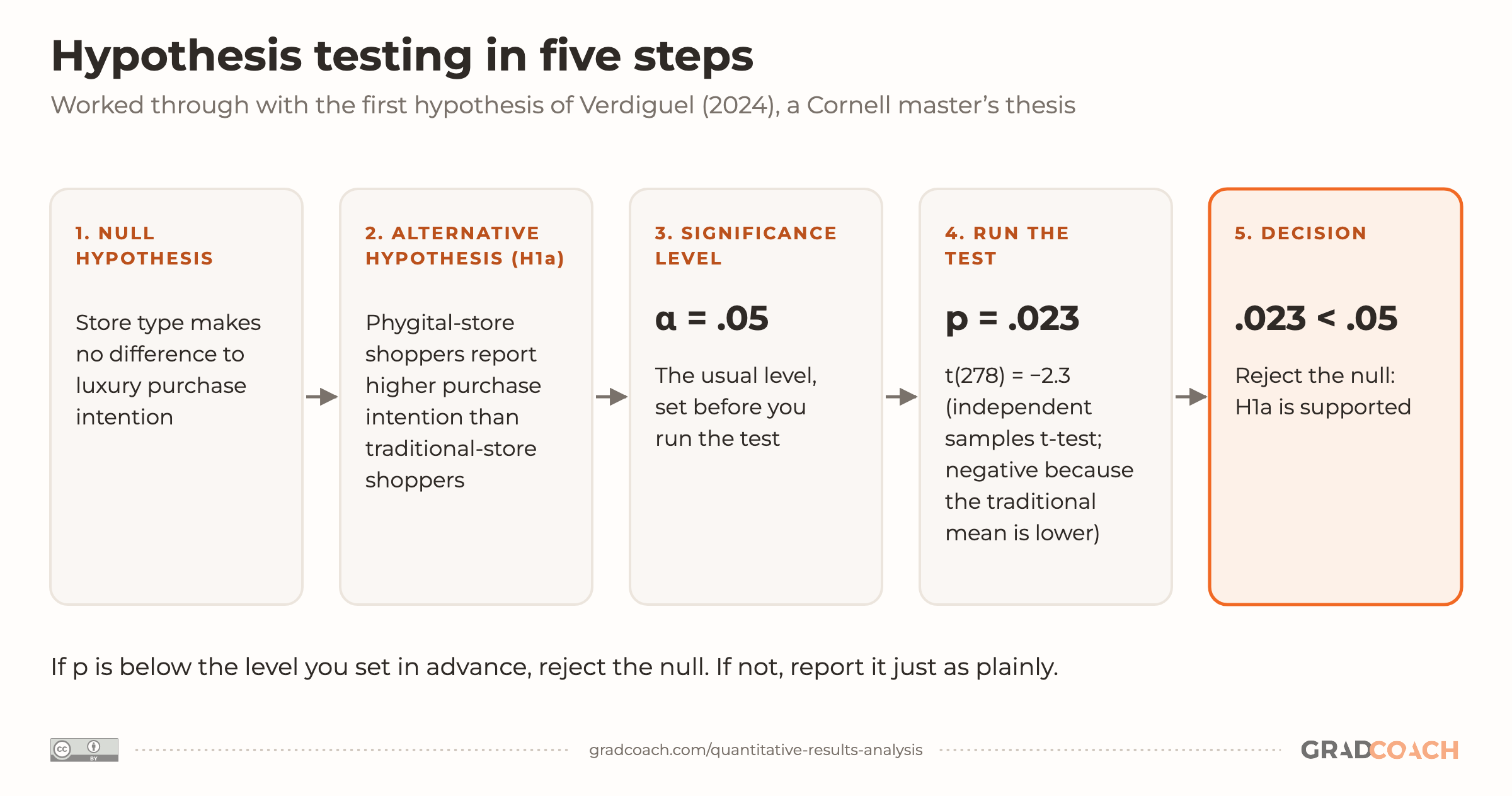
The basic process for hypothesis testing runs like this:
- State your null hypothesis (for example, “Store type makes no difference to luxury purchase intention”).
- State your alternative hypothesis (for example, “Shoppers in a phygital store report higher luxury purchase intention than those in a traditional store”).
- Set your significance level (usually .05).
- Run your test and find your p-value (for example, p = .023).
- Draw your conclusion: because .023 is below .05, you reject the null hypothesis, and the data support your alternative hypothesis.
Here’s the same process as one flow, using the first hypothesis of the Cornell thesis from earlier:

The example hypotheses in the list paraphrase its H1a. The thesis tested its first three hypotheses with t-tests and reported the first like this:
Verdiguel names the test and the hypothesis, gives both groups’ means and standard deviations, then the test statistic and p-value, and ends on a one-line verdict. Follow that shape for each of your hypotheses, including the ones that weren’t supported: report them just as plainly, like the H2a result earlier. Add an effect size to each result too (APA’s standards ask for one).
Finally, if the aim of your study is to develop and test a conceptual framework, this is where you show the tested model, for example your framework with each path’s result marked. Save the discussion of what it means for the next chapter.
And if most of your hypotheses came back unsupported, the video below covers what to do next:
Step 8 – Provide a chapter summary
To wrap up your results chapter and lead into the discussion chapter, give a brief summary of your main findings. Like the chapter introduction, a paragraph or two is plenty. Highlight the findings most relevant to your research questions, and stop there.
Some final thoughts, tips and tricks
Four habits make a results chapter easier to examine:
- Report your findings in the past tense. You’re describing what you found in your data, not what you’re looking for.
- Structure the chapter systematically and sequentially. If you ran two experiments and the findings from one fed into the other, report them in that order.
- Make your own tables and graphs instead of pasting them in from SPSS or another statistics package. Raw output is cluttered, and it rarely follows your program’s formatting rules.
- Check the chapter against your research questions once you’re done. Make sure you’ve given enough information to answer each one, and cut anything that doesn’t help.
If you work through those four habits and the eight steps above, you’ll have a results chapter your committee can follow from start to finish, and a solid base for the discussion chapter that comes next.
Still have questions?
What should not be included in the results section?
Leave out interpretation, explanations of why a result happened and comparisons with other studies, because those belong in the discussion chapter. Also leave out raw software output, analyses that don’t address your research questions, and figures that only repeat a table. Your methods, too, should already be described in the methodology chapter rather than repeated here.
What tense should the results section be in?
Write your results in the past tense, because you’re reporting what you found: “Participants in the experimental group scored higher.” When you point to a table or figure, the present tense often reads more naturally (“Table 4 shows the descriptive statistics”), but conventions vary, so check your university’s style guide.
How long should a dissertation results chapter be?
There’s no standard length, because it depends on your level of study, your field and how many research questions and hypotheses you have. A study with one hypothesis needs far less than one testing ten. Check your program’s guidance on chapter lengths, and look at a few recent dissertations from your department to see what’s typical there.
Is there a difference between results and findings?
In most dissertations, no: “results chapter” and “findings chapter” name the same thing, and universities use both, though “findings” tends to be more common in qualitative work. Use whichever term your program’s handbook uses, and stick to it throughout.
How do I present survey results in a dissertation?
Start with who responded: the response rate and the sample’s demographics. Then report the reliability of any multi-item scales, the descriptive statistics for each question or scale (percentages for categories, means and standard deviations for numerical scores), and finally any inferential tests, taking your research questions or hypotheses one at a time. Use tables for anything with more than a handful of numbers.
Can I use ChatGPT to write my results chapter?
Not to draft it for you. The sentences that report your findings have to be your own, and pasting in AI-written text, even reworded, can count as misconduct under many universities’ rules. Using a tool to explain what a statistic means, or to check that your wording matches your output, is a different thing. Your program’s AI policy says where the line sits and whether you need to declare any use, so read it before you start.
Can’t find your answer here? Ask a Grad Coach directly – the initial chat is free.
Speak with a friendly coach →


Cite-worthy sources
Cite this article
Jansen, D. (2021). How to Write the Results Section. Grad Coach. https://gradcoach.com/quantitative-results-analysis/
- American Psychological Association. (n.d.). JARS–Quant Table 1: Information recommended for inclusion in manuscripts that report new data collections regardless of research design. APA Style.
- Luong, V. D. (2025). Factors influencing e-commerce consumer’s adoption intention towards collection-and-delivery points (CDPs): The case of Vietnam [Doctoral dissertation, Lincoln International Business School, University of Lincoln].
- Osumi, A. (2019). Exploring motivation for learning Japanese as a foreign language [Master’s thesis, Purdue University].
- Tavakol, M., & Dennick, R. (2011). Making sense of Cronbach’s alpha. International Journal of Medical Education, 2, 53-55.
- Tunstall, C. M. (2026). Confirmatory factor analysis and further validation of the Trent Measure of Vicarious Trauma (TMVT) [Doctoral thesis, University of Lincoln].
- Verdiguel, N. R. (2024). Phygital design: Boosting luxury purchase intention by enhancing consumer perceptions of in-store usefulness and playfulness [Master’s thesis, Cornell University].
Found this helpful?
Keep us near the top of your Google results.