
Free download
APA 7 Tables Template
Ready-formatted APA 7 tables, for the tests you're most likely to run. Free to download. Instant access.
Your template is ready
It opens in a new tab, so this page stays right where it is.
Open your template


Developed by Grad Coach's Doctoral-Qualified Team20 Million Downloads · Used by 500+ Universities
4.9 Stars
Client Satisfaction
10,000+
Students coached
100%
Client Pass Rate
20 Million
Video Lesson Downloads
What it covers
Formatting tables is where a results chapter loses an afternoon. This Word file gives you the seven tables a quantitative dissertation or thesis most often needs, already set up to APA 7th edition, so you replace the numbers rather than fight the borders. It’s built on the same statistics work we do with students every week. You get:
- Participant characteristicsCounts and percentages for your sample
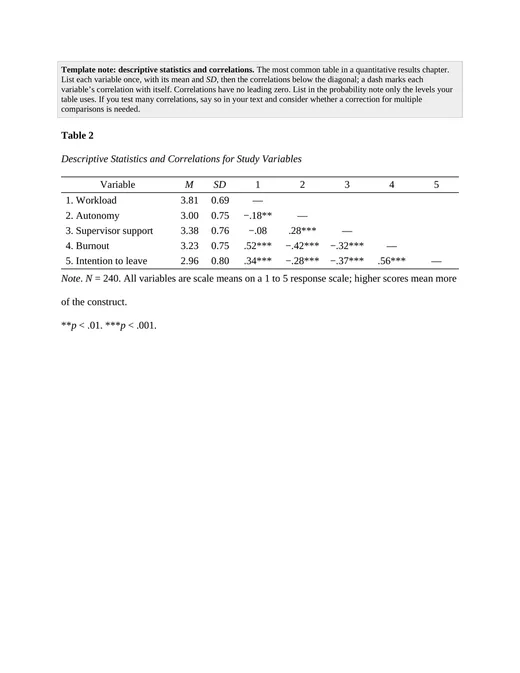
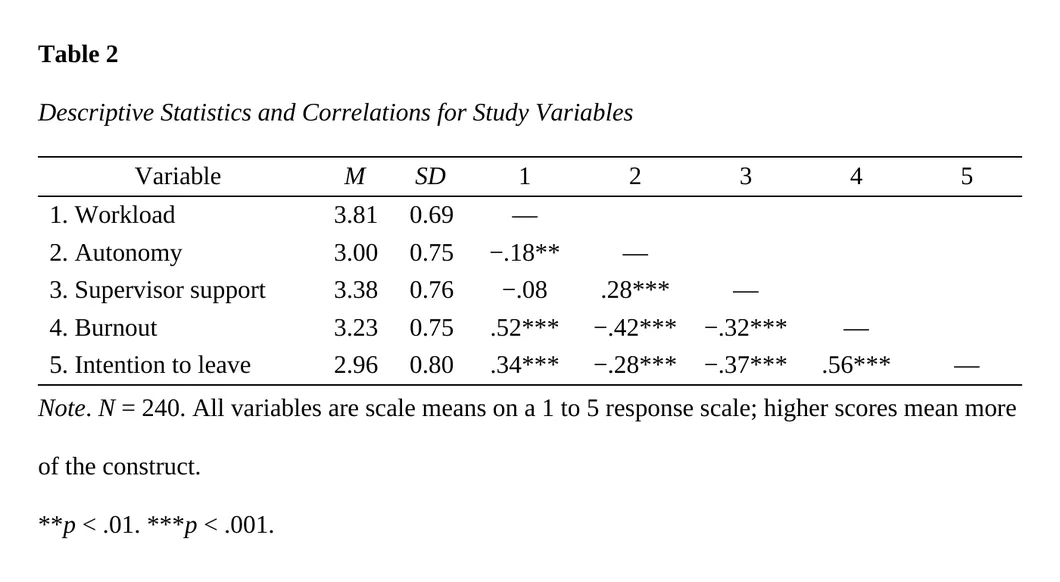
- Descriptives and correlationsMeans, SDs and a correlation matrix in one table
- ReliabilityItems and Cronbach's alpha for each scale
- Independent-samples t testTwo groups, with Cohen's d
- One-way ANOVAThree or more groups, with eta squared and post hoc results
- Chi-squareCounts and row percentages, with Cramér's V
- Multiple regressionb, SE, β, t, p and 95% confidence intervals
Each table comes with a short gray note explaining what goes in it and the APA rules that trip people up. Delete the notes before you submit, and the tables are ready to go.
See a finished table
Every value in the template comes from one simulated study of 240 early-career employees, worked through in statistics software and checked a second time in another package. That means the tables agree with each other, the way yours will have to, and every number is formatted the way APA asks: no leading zero on a p value or a correlation, exact p values down to <.001, and italics on the statistical symbols.
The values are examples, not findings. They’re there to show you what a correctly formatted table looks like when it’s full. You can see all seven tables in a PDF preview before you download the Word file.
Frequently asked questions
What are the main APA 7 rules for tables?
The table number goes in bold, with the title one double-spaced line below it in italics and title case. Use horizontal lines only, at the top and bottom of the table, under the column headings and under any heading that spans several columns. There are no vertical lines. Notes sit below the table: a general note first, then specific notes, then the probability note for any asterisks.
Which version of Word do I need?
Any recent version of Microsoft Word will do. The file also opens in Google Docs and LibreOffice, although Word gives you the most reliable result with the table borders.
How do I add rows or columns without breaking the format?
Click in a body row and use Word’s own Insert Row Above or Below, so the new row takes on that row’s formatting. The lines at the top and bottom belong to the table itself, so they stay put. Just avoid inserting right beside a heading or total row, because the new row copies its line too.
Should I double-space my tables?
You don’t have to. APA 7 allows single, one-and-a-half or double spacing inside a table, as long as it’s readable. The template uses single spacing in the table body and double spacing for the number, title and notes. Check your university’s handbook, though, because some programs set their own rule.
Does a p value need a zero before the decimal point?
No. A p value can’t be bigger than 1, so APA drops the leading zero (p = .03). The same goes for correlations, alpha and R squared. Values that can exceed 1, such as means, t, F, Cohen’s d and a standardized beta, keep it.
Do I need a table for every test I run?
No. A single result is often clearer in a sentence. Tables earn their place when you’re reporting several related results, such as one test across three outcomes, or a full correlation matrix. And don’t repeat every value from a table in your text. Point the reader to what matters.
Where do the tables go in my dissertation?
Put each table close to where you first mention it in your results chapter, and number them in that order. Some universities ask for tables at the end of the chapter or in an appendix instead, so check your handbook. Our results chapter template shows where they sit in the chapter as a whole.
My university uses a different style. Can I still use this?
Yes, as a starting point. Most of the layout is common across styles, but check your handbook for the details that differ, such as the title position and the font.
Can I share this template with my friends/colleagues?
Yes, you’re welcome to share it in its original format. If you want to post about it on your blog or social media, all we ask is that you reference this page as your source.
Do you have templates for the other dissertation chapters?
Yes, we do. You can find our full collection of templates here.
Get your copy, now.
Your template is ready
It opens in a new tab, so this page stays right where it is.
Open your template