MLA Format 9th Edition:
How to Set up Your Paper
Page one to Works Cited in MLA 9, with real examples and a template


The 30-second summary
To format a paper in MLA 9, use one-inch margins, a legible 12-point font and double spacing throughout. Then four rules cover the rest:
- No title page: your name, instructor, course and date go at the top left of page one, with the title centered below.
- A running header with your last name and the page number sits top right on every page.
- Author-page citations give the last name and page number, with no comma between them.
- Works Cited starts a new page, sorted alphabetically, with half-inch hanging indents.
Want it done for you? The free MLA template comes with the layout preformatted.
Navigate
MLA formatting is where students lose easy points for small slips. A missing page header, a title page nobody asked for, or a Works Cited list without hanging indents tells your instructor you skimmed the rules before they’ve read a word of your argument.
In this post, I’ll walk you through the MLA 9 rules every student paper needs, from the four-line heading on page one to the last entry in your Works Cited list, with examples you can copy. It comes from the team that has coached 10,000+ students through their research writing, and if you’d rather skip the setup, our free MLA template comes preformatted.
How an MLA paper is structured
A student paper in MLA 9th edition has no separate title page. Unless your instructor asks for one, or the paper is a group project, everything starts on page one. Here’s the order, top to bottom:
- The first-page heading and title, which sit directly above your opening paragraph.
- The body of your paper, starting on the same page.
- Appendices, if you have any. They’re uncommon in a short paper.
- Notes, if you’ve used endnotes.
- The Works Cited list, which always comes last and starts on a new page.
Only the first two and the last are needed in every paper. Your university or instructor may also have their own requirements on top of MLA’s, so check those before you submit; where they differ from what’s below, follow them.
MLA page setup: margins, font and spacing
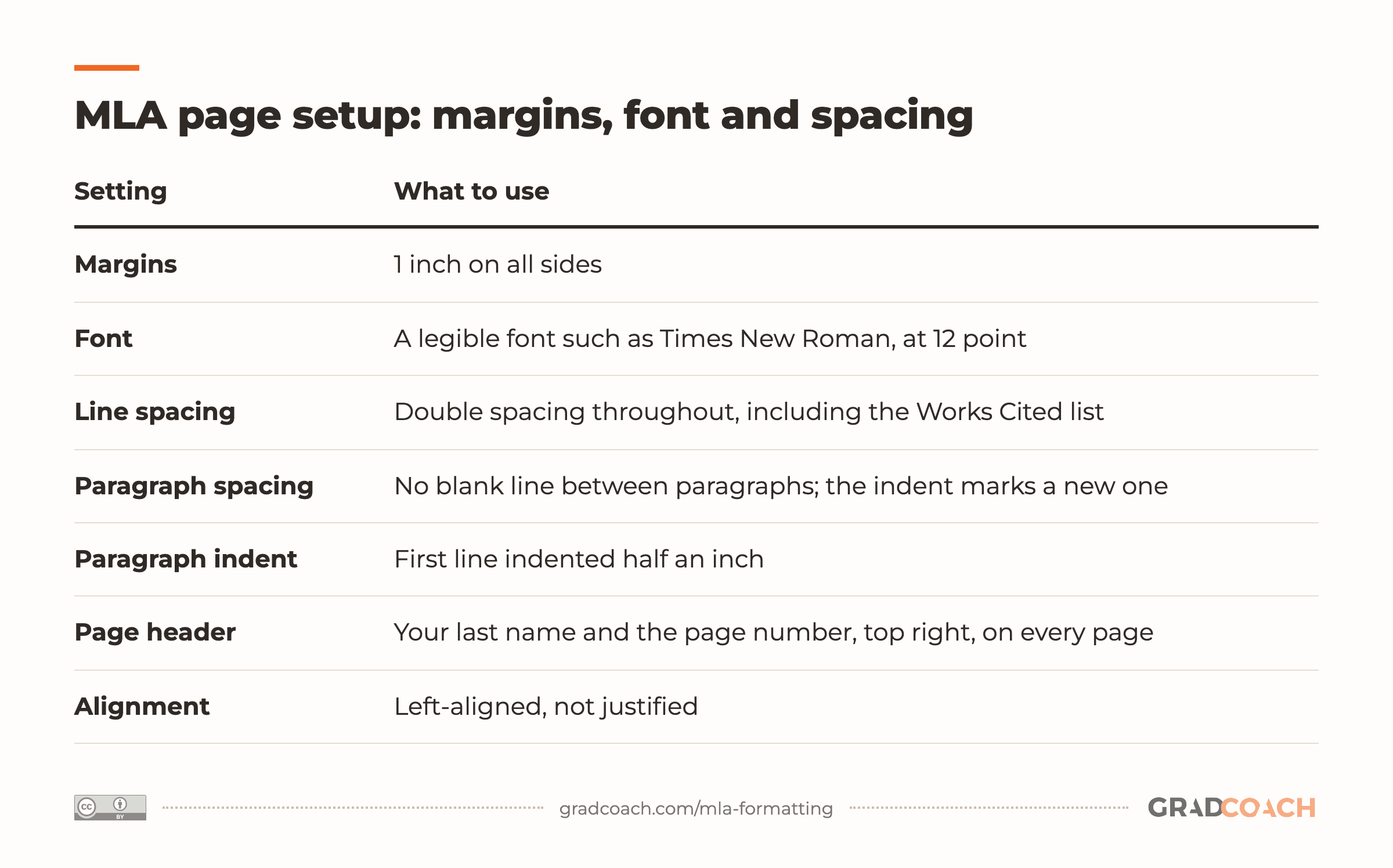
Set your document up before you start writing, because fixing spacing and headers in a finished paper is tedious. Here’s every page-level setting in one place:
| Setting | What to use |
|---|---|
| Margins | 1 inch on all sides |
| Font | A legible font such as Times New Roman, at 12 point |
| Line spacing | Double spacing throughout, including the Works Cited list |
| Paragraph spacing | No blank line between paragraphs; the indent marks a new one |
| Paragraph indent | First line indented half an inch |
| Page header | Your last name and the page number, top right, on every page |
| Alignment | Left-aligned, not justified |
A few of these deserve a note. Paragraph spacing and alignment are standard practice rather than rules MLA spells out, though most instructors expect both. Times New Roman is the safe default font, because nobody will question it, and whichever font you pick, use it everywhere, headings included.
The page header goes on every page, the first one too, unless your instructor tells you to leave it off page one. And if you’re writing a thesis that will be printed and bound, your university will probably ask for a wider left margin than MLA’s one inch, and its formatting guide wins there.
The first page
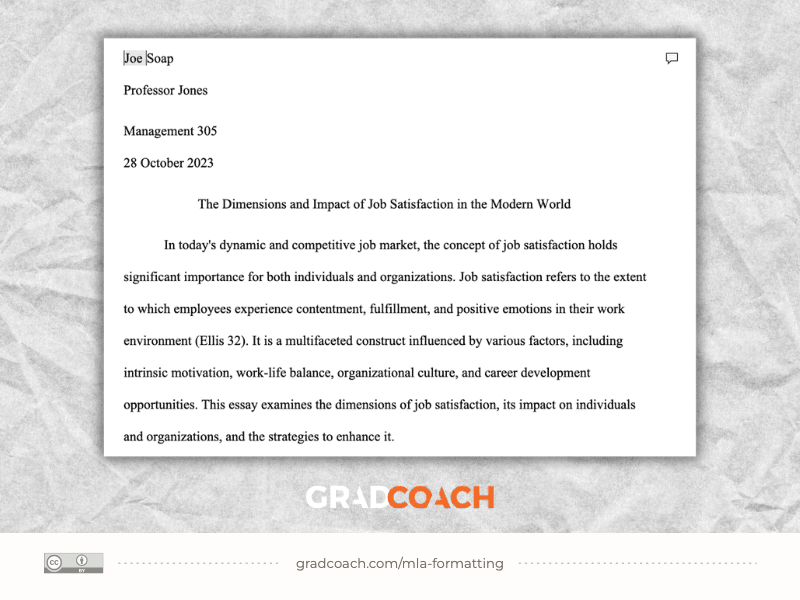
The MLA heading on page one does the job a title page does in other styles. Put the following on separate lines at the top left, double-spaced like the rest of the paper:
- Your full name
- Your instructor’s name
- The course name or number
- The date, written in full (for example, 17 October 2026)
On the next line, center your title. Write it in title case, with no bold, underlining or quotation marks; the only exception is the title of another work inside it, which takes italics or quotation marks just as it would in your text. Your first paragraph starts on the line after that.
Here’s the top of page one in our MLA template. Look at how plain the heading and title are:

One thing this screenshot doesn’t show is the running header: your page also needs your last name and the page number in the top-right corner, page one included.
Headings in MLA
MLA advises against overusing headings in short papers, so many essays have none. If yours is long enough to need them, MLA leaves the styling to you, within a few rules:
- Title case for every heading, since MLA capitalizes headings like the titles of works.
- Flush left is MLA’s default for headings, so they can’t be mistaken for block quotations; your title and the Works Cited and Notes headings are the ones centered.
- One style per level: MLA counts your paper’s title as the first, most prominent level, so every section heading looks the same, every subheading looks the same, and each level is visibly less prominent than the one above it (for example, bold for section headings and italics for subheadings).
- At least two headings at any level you use. A single subheading under a section means you either need a second one or don’t need the first.
MLA also suggests avoiding numbered headings unless your discipline normally numbers them. If you use several heading levels, it’s worth telling your instructor which style marks which level.
MLA in-text citations
MLA uses an author-page system. Each citation gives the author’s last name and the page number you’re drawing on, separated by a space and no comma. You can write it two ways.
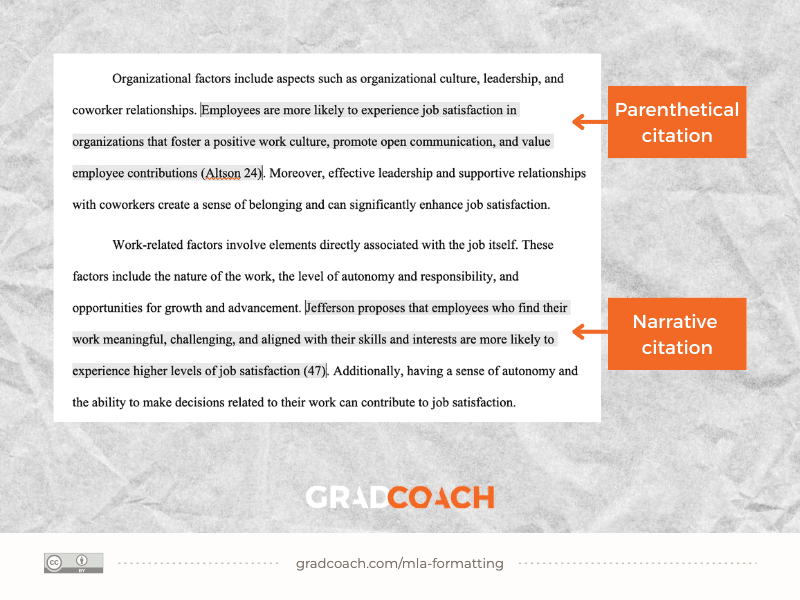
A parenthetical citation puts both in parentheses at the end of the sentence:
MLA 9th edition is easy to grasp once you know its core rules (Jansen 13).
A narrative citation names the author in your sentence and leaves only the page number in parentheses:
Jansen states that MLA 9th edition is easy for students to grasp once they know its core rules (13).
I’d use a mix of the two. A narrative citation is the better choice when the author’s identity matters to your argument, for instance when you’re setting two authors against each other. A parenthetical one keeps the focus on the idea itself.
A few situations change the format slightly:
- Quotations work the same way. Put the quoted words in quotation marks and the citation after them: Jansen proposes that MLA is “easy to grasp once you know its core rules” (13).
- Two authors both get named, joined by “and”: (Jansen and Warren 13).
- Three or more authors shorten to the first author plus “et al.”: (Jansen et al. 13).
- No page numbers, which is common with web pages, means you give the author alone: (Jansen).
- Long quotations of more than four lines of prose become a block quotation: its own paragraph, indented half an inch, with no quotation marks.
Here are both types inside two paragraphs from our free MLA template. Watch where the period falls in each:

Look at where the period sits in each one: after the closing parenthesis, not before it. The one exception is a long block quotation, where the citation comes after the quotation’s final punctuation. Every citation in your paper also needs a matching entry in your Works Cited list, which is where the full details go.
The Works Cited page
Your reference list is called Works Cited in MLA, and it starts on a new page after the body (and after any appendices and notes). Center the title “Works Cited” at the top, with no bold or quotation marks, then set out the entries:
- Double-spaced, like the rest of the paper.
- Alphabetical by the first word of each entry, usually the author’s last name, or the title where there’s no author.
- Hanging indents of half an inch, so the first line of each entry sits at the margin and the lines below it are indented.
- One entry for every source you cited in the body, and no entries for sources you didn’t.
Each entry is built from the same set of what MLA calls core elements, in this order, with this punctuation:
Author. Title of source. Title of container, Other contributors, Version, Number, Publisher, Publication date, Location.
You only include the elements your source actually has. The “container” is the larger thing your source sits inside: the journal an article was published in, or the website a page belongs to. For an online source, the location includes its DOI if it has one, written as a full link, and otherwise its URL, where you can usually leave off the “https://”.
Here’s how that works out for the three kinds of source you’ll cite most, starting with a book. All three are real sources.
A journal article adds its container, the journal, along with the volume, issue, page range and DOI:
A web page with no named author is the odd one out, because it opens with its title:
Each one keeps the core-element order and simply drops the elements it doesn’t have. Whole works (the book, the journal, the website) are italicized, and parts (the article, the page) go in quotation marks. When you write your own entries, find your source type’s nearest match here and copy its pattern.
Pro tip: Don’t build your Works Cited list entirely by hand. A reference manager such as Mendeley or Zotero formats every entry for you and keeps your citations and list in sync, and both are free. If you haven’t used one before, this walkthrough of Mendeley gets you started in a few minutes:
Whichever tool you use, check its output against the three examples above before you submit, because the details a reference manager imports are often incomplete.
MLA abbreviations
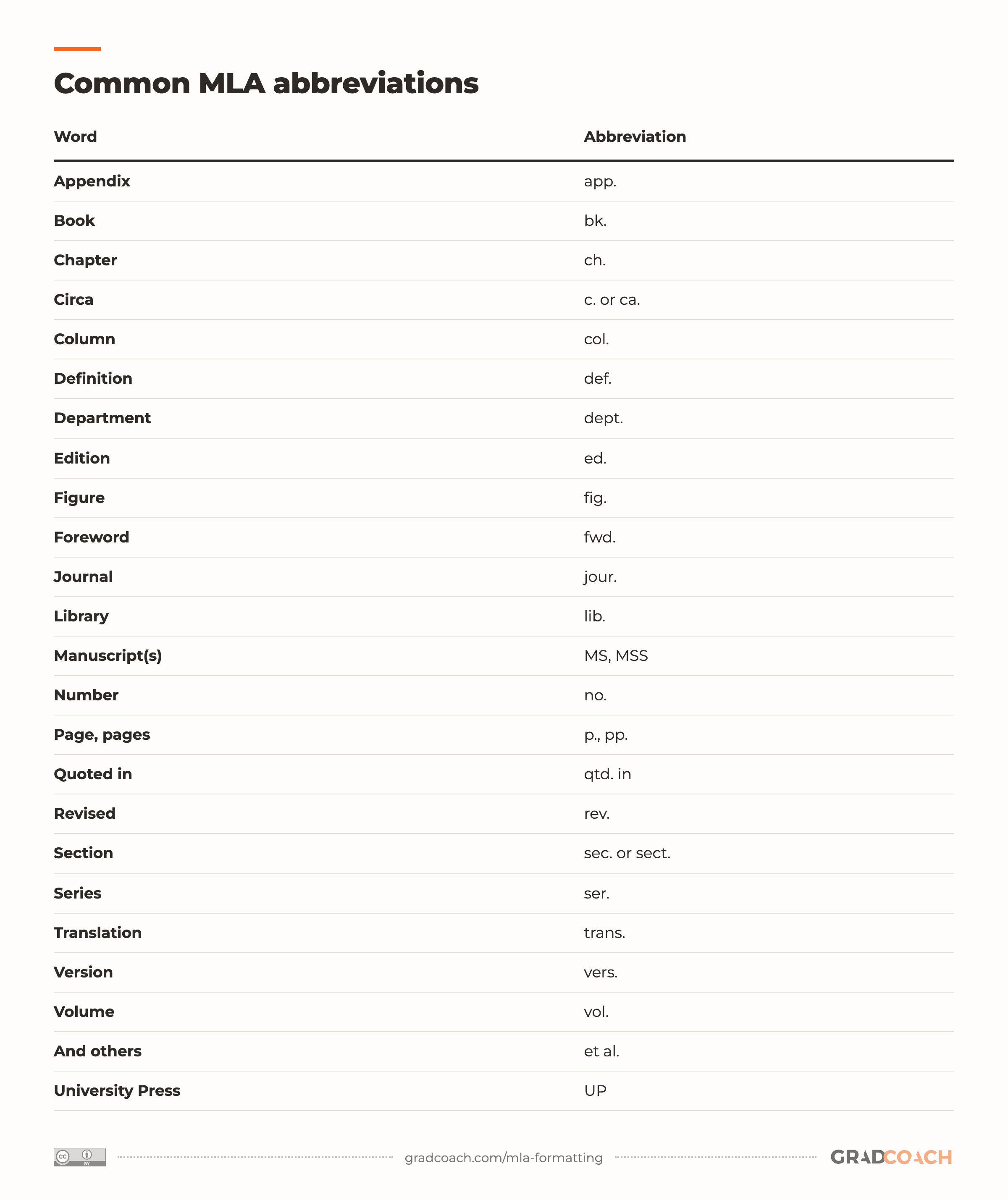
MLA uses standard abbreviations mainly in citations and the Works Cited list; in your own sentences, spell the words out. These are the ones you’re most likely to need:
| Word | Abbreviation |
|---|---|
| Appendix | app. |
| Book | bk. |
| Chapter | ch. |
| Circa | c. or ca. |
| Column | col. |
| Definition | def. |
| Department | dept. |
| Edition | ed. |
| Figure | fig. |
| Foreword | fwd. |
| Journal | jour. |
| Library | lib. |
| Manuscript(s) | MS, MSS |
| Number | no. |
| Page, pages | p., pp. |
| Quoted in | qtd. in |
| Revised | rev. |
| Section | sec. or sect. |
| Series | ser. |
| Translation | trans. |
| Version | vers. |
| Volume | vol. |
| And others | et al. |
| University Press | UP |
The Purdue OWL keeps a fuller list of MLA abbreviations, and the MLA Handbook itself has the complete one. The two you’ll use most are “vol.” and “no.” for journal articles, as in the Braun and Clarke entry above.
Still have questions?
Is MLA format double spaced or 1.5 spaced?
MLA 9 is double spaced throughout, including the heading on page one, block quotations and the Works Cited list. Don’t add blank lines between paragraphs either; the half-inch indent marks each new one. If your instructor asks for 1.5 spacing, follow them, since a course’s own rules override MLA’s.
What font and size does MLA require?
MLA doesn’t require one particular font, only a legible one at 12 point. Times New Roman is the common choice, and the one the Purdue OWL uses as its example.
Do you need a title page in MLA format?
No. An MLA 9 paper puts your name, your instructor’s name, the course and the date at the top left of page one, with the title centered below them. Only add a title page if your instructor asks for one or the paper is a group project.
How do you cite a source with no page numbers?
Give the author’s last name on its own, for example (Jansen). This is common with web pages. If the source numbers its paragraphs instead, cite the number with “par.” and a comma after the name, as in (Jansen, par. 4); that comma is the exception to MLA’s no-comma rule.
Do you need a DOI or URL in an MLA citation?
For an online source, MLA 9 prefers a DOI where the source has one, written as a full link, for example https://doi.org/10.1191/1478088706qp063oa. Without a DOI, use a permalink or the URL, where you can usually leave off “https://”. Instructors differ on whether they want URLs at all, so check what yours expects.
What’s the difference between MLA and APA?
MLA cites by author and page number, (Jansen 13), while APA cites by author and year, (Jansen, 2023). MLA usually needs no title page and calls its reference list Works Cited; APA uses a title page and a References list. MLA is mostly used in the humanities, APA in the social sciences. Our APA 7 formatting guide walks through APA the same way.
Does MLA set a length or number of paragraphs?
No. MLA governs how a paper is formatted and how sources are cited, not how long it is or how many paragraphs it has. The “five-paragraph essay” is a teaching structure, not an MLA rule. The word count and structure come from your assignment instructions.
Can’t find your answer here? Ask a Grad Coach directly – the initial chat is free.
Speak with a friendly coach →


Found this helpful?
Keep us near the top of your Google results.